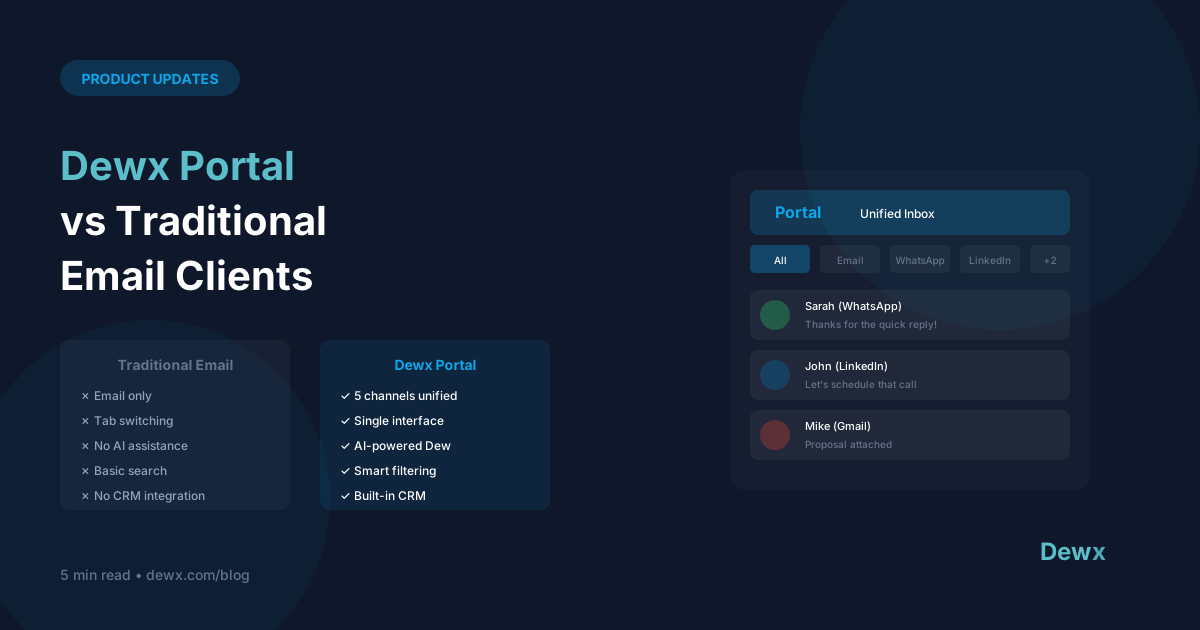
Dewx Portal vs Traditional Email Clients
Dewx Portal isn't just another email client. Here's how it's different.
The Core Difference
Traditional Email Clients: Manage email Dewx Portal: Manage ALL communication
Feature Comparison
| Feature | Gmail/Outlook | Dewx Portal |
|---|---|---|
| ✅ | ✅ | |
| ❌ | ✅ | |
| ❌ | ✅ | |
| ❌ | ✅ | |
| Unified search | Email only | All channels |
| AI drafting | Limited | Full Dew AI |
| CRM integration | Add-ons | Native |
| Contact profiles | Basic | Comprehensive |
When Email Clients Win
Deep Email Features
Gmail and Outlook have decades of email-specific features:
- Advanced filtering rules
- Extensive label/folder systems
- Deep calendar integration
- Massive storage
Enterprise Compliance
For highly regulated industries:
- Legal hold
- eDiscovery
- Compliance archiving
Pure Email Workflows
If you truly only use email:
- Simpler interface
- No extra features to ignore
When Dewx Portal Wins
Multi-Channel Reality
Most businesses use 3+ messaging channels:
- Email for formal communication
- WhatsApp for quick coordination
- LinkedIn for B2B outreach
- Instagram for customer engagement
Portal brings them together.
Context Across Channels
See a contact's full history:
- Email thread from last month
- WhatsApp conversation yesterday
- LinkedIn message from last year
All in one profile.
AI-First Experience
Dew AI is built into every interaction:
- Draft responses with context
- Summarize long threads
- Suggest follow-ups
- Automate routine replies
CRM Without Extra Steps
Every conversation becomes CRM data:
- Contacts auto-created
- Interactions logged
- No manual data entry
The Hybrid Approach
You don't have to choose exclusively. Many users:
- Keep Gmail/Outlook for deep email work
- Use Dewx Portal for unified communication
Portal syncs with your existing email, so nothing is lost.
Real User Scenarios
Agency Owner
Before: Gmail + WhatsApp Business + LinkedIn = 3 apps, 3 inboxes, messages everywhere After: Dewx Portal = 1 inbox, all clients, full context
Consultant
Before: Outlook + WhatsApp + separate CRM = copy-paste, manual logging After: Dewx Portal = automatic logging, AI drafts, unified contacts
Small Business
Before: Gmail + Instagram DMs + missed messages After: Dewx Portal = nothing falls through cracks
Making the Switch
What Transfers:
- All email history syncs
- Contacts import
- Conversation threads preserved
What Changes:
- New unified interface
- AI assistance available
- Cross-channel visibility
What You Keep:
- Your email address
- Your other accounts
- Your data (always exportable)
Try Both
The best way to compare is to experience both:
- Connect your email to Dewx Portal
- Use for a week
- See the difference multi-channel unified inbox makes
Frequently Asked Questions
Can I still use Gmail/Outlook directly while using Portal?
Yes. Portal syncs bidirectionally. Emails you send from Gmail appear in Portal, and emails you send from Portal appear in Gmail. You can use whichever interface is convenient at the moment. Many users keep Gmail for calendar and use Portal for messaging.
Does Portal support email rules and filters?
Basic filtering is available in Portal (archive, label, priority). For complex rules, you can keep them in Gmail/Outlook—Portal will reflect whatever those rules do. We're adding advanced Portal-native filtering in upcoming releases.
How does Portal handle attachments and large files?
Same as the native platforms. Email attachments sync fully. WhatsApp media syncs. LinkedIn attachments are viewable. Portal doesn't compress or limit what the underlying platforms support.
What happens if I want to stop using Portal?
You can disconnect anytime. Your email stays in Gmail/Outlook, your WhatsApp stays in WhatsApp. Portal doesn't lock you in or hold your data hostage. However, Portal-specific data (internal notes, tags) would need to be exported.
Is Portal slower than native Gmail/Outlook?
For email-only work, native apps may feel slightly faster since they're optimized for one channel. But the time saved not switching between apps more than compensates. Most users report net faster workflows despite any individual channel being marginally slower.
Start your comparison. Try Dewx Portal free and see unified messaging in action.
Related: Portal features | Gmail integration