How to Choose Business Software in 2026
There are 30,000+ SaaS products. Here's how to choose wisely.
The Evaluation Framework
Step 1: Define the Problem
Before looking at solutions:
- What specific problem are you solving?
- What does success look like?
- What's the cost of NOT solving this?
Write it down. Be specific.
Step 2: List Must-Haves vs Nice-to-Haves
Must-Haves: Deal-breakers if missing Nice-to-Haves: Would be great, but not essential
Be ruthless. Most "must-haves" are actually nice-to-haves.
Step 3: Consider Integration Needs
What other tools must it connect with?
- Email/calendar
- Existing CRM
- Accounting software
- Communication tools
Step 4: Evaluate Pricing Honestly
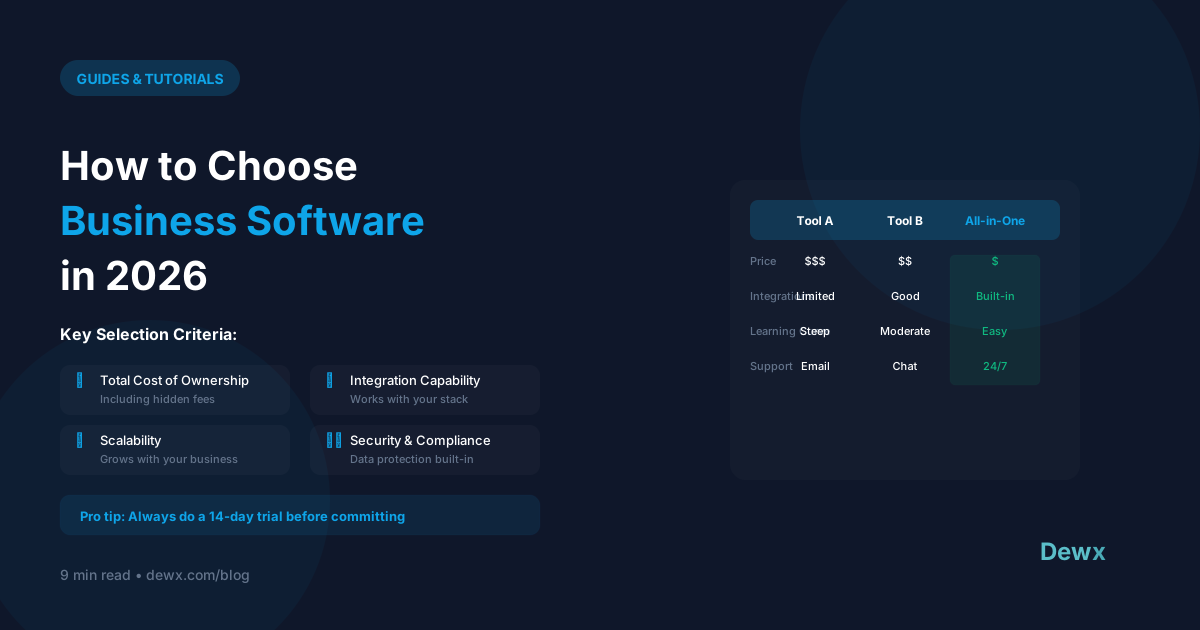
Calculate Total Cost of Ownership:
- Monthly/annual subscription
- Per-user costs as you grow
- Add-on features you'll need
- Implementation/training time
- Integration costs
The Evaluation Matrix
| Criteria | Weight | Tool A | Tool B | Tool C |
|---|---|---|---|---|
| Must-have 1 | 10 | 8 | 9 | 7 |
| Must-have 2 | 10 | 9 | 7 | 8 |
| Integration | 8 | 7 | 9 | 6 |
| Price | 7 | 8 | 6 | 9 |
| Ease of use | 6 | 9 | 7 | 8 |
| Total | 178 | 168 | 166 |
Red Flags to Watch
1. Feature Bloat
Tools with 100 features you'll use 5 of.
2. Pricing Tricks
- Low starter price, expensive scaling
- Essential features behind upgrade
- Per-user pricing that explodes
3. Poor Mobile Experience
If you need mobile access, test it thoroughly.
4. Vendor Lock-in
- No data export
- Proprietary formats
- High switching costs
5. Support Issues
- No clear support channels
- Slow response times
- Pay-for-support models
Evaluation Process
Week 1: Research
- Define requirements
- Create shortlist (3-5 options)
- Review G2/Capterra reviews
Week 2: Demo
- Book demos with finalists
- Prepare specific questions
- Involve key users
Week 3: Trial
- Test with real workflows
- Identify deal-breakers
- Check integration reality
Week 4: Decide
- Score options
- Make decision
- Plan implementation
Questions to Ask Vendors
- What's your uptime SLA?
- How do you handle data security?
- What's the real cost at our scale?
- How does data export work?
- What support is included?
- What's on your roadmap?
- Can we talk to similar customers?
2026 Software Trends
Trend 1: Consolidation
All-in-one platforms replacing tool sprawl.
Trend 2: AI Integration
Expect AI features in every category.
Trend 3: Usage-Based Pricing
Pay for what you use, not user seats.
Trend 4: API-First
Integration capabilities are table stakes.
The Consolidation Question
Before adding another tool, ask:
- Could an existing tool do this?
- Could we replace multiple tools with one?
- Is the benefit worth another login/subscription?
Sometimes the best software decision is NOT adding more software.
Dewx's Approach
Dewx consolidates multiple tools into one platform:
- Unified inbox (replaces email apps)
- CRM (replaces separate CRM)
- Operations (replaces HR/finance tools)
- AI assistant (replaces standalone AI)
One subscription. One login. One data source.
For software comparisons, see our alternatives hub with guides for HubSpot, Salesforce, Monday.com, and more.
Frequently Asked Questions
How many tools should a small business have?
Aim for under 10 core tools. Most SMBs use 10-20 and could consolidate to 5-8. Each additional tool adds login overhead, integration complexity, and cost. The "best of breed" approach often creates more problems than it solves at small scale.
Should I prioritize features or ease of use?
Ease of use, almost always. A powerful tool that nobody uses is worthless. A simple tool used consistently beats a complex tool ignored. Evaluate ease of use with your actual team members, not just yourself.
How do I handle vendor lock-in concerns?
Ask about data export before signing up. Test the export functionality during your trial. Choose tools with standard data formats (CSV, JSON). Avoid proprietary formats that make migration difficult. Dewx offers full data export anytime.
When is it worth paying more for software?
When it genuinely saves time or makes money. Calculate hourly cost: $100/month extra that saves 5 hours/month is worth it if your time costs $20+/hour. Also factor in: reduced errors, better customer experience, team productivity. Cheap tools that create problems cost more in the end.
How do I convince my team to switch tools?
Involve them in selection. Demo finalists together. Address concerns directly. Start with willing adopters. Provide training and documentation. Set clear timeline for transition. Celebrate wins during rollout. Don't force change without explaining benefits.
Simplify your software stack. Explore Dewx features or start your free trial today.
Related: Software alternatives | Dewx comparisons