Meet Dew: Your AI Business Assistant That Actually Takes Action
Key Takeaways
- Dew is not just another chatbot - it's an AI assistant deeply integrated into your business data, communications, and workflows
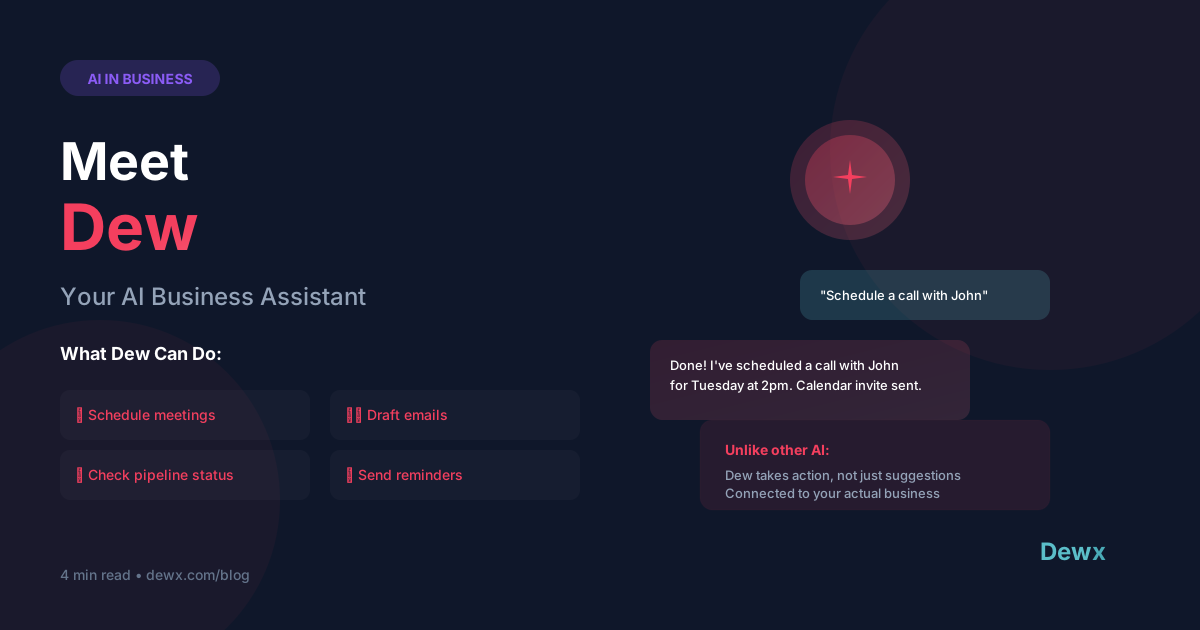
- Dew takes action, not just suggestions - schedules meetings, drafts emails, updates CRM records, and runs reports
- Natural language commands let you work like you have a human assistant: "Draft a follow-up for John about the proposal"
- Context-aware intelligence means Dew knows your contacts, conversation history, deals, and preferences
- Works across all Dewx hubs - Portal, GTM, CX, and OPS - for truly unified AI assistance
What if you had an assistant who:
- Never forgot a follow-up
- Could schedule meetings in seconds
- Drafted perfect emails on command
- Knew everything about your business
- Worked 24/7 without breaks
That's Dew.
The Problem with Current AI Assistants
ChatGPT and similar tools are impressive. But ask them to "schedule a call with John" and they'll give you instructions on how to use Google Calendar. They can't actually do it.
That's because they're disconnected from your business. They don't know who John is, when you're both free, or which channel John prefers.
Dew is different. Dew is integrated.
What Makes Dew Different
1. Connected to Your Actual Business
Dew has access to:
- Portal - All your messaging conversations across WhatsApp, LinkedIn, Gmail, etc.
- GTM Hub - Your CRM, pipeline, deals, and sales data
- CX Hub - Projects, tasks, and customer tickets
- OPS Hub - Finance, HR, and operational data
- Calendar - Your availability and meeting history
- Contacts - Rich profiles with full interaction history
When you ask Dew something, it has the context to actually help.
2. Takes Action, Not Just Suggestions
| Other AI | Dew |
|---|---|
| "Here's how to write a follow-up email..." | Actually drafts the email, ready to send |
| "You should schedule a meeting at 3pm" | Books the meeting on both calendars |
| "Consider updating your CRM with this info" | Updates the CRM record automatically |
| "Here's a summary template..." | Generates the actual report with real data |
Dew doesn't just tell you what to do - it does it (with your approval when appropriate).
3. Learns Your Preferences
Over time, Dew learns:
- Your writing style for different types of messages
- Your preferred meeting times and durations
- How you organize contacts and deals
- Your common workflows and responses
The more you use Dew, the better it gets.
What Can Dew Do?
Communication Commands
"Draft a follow-up email to Sarah about the design feedback"
"Reply to John's WhatsApp saying I'll call him tomorrow at 2pm"
"Send a quick thank you to everyone who attended the webinar"
"Summarize my last 5 conversations with Acme Corp"
Scheduling Commands
"Schedule a 30-minute call with John next week"
"Find a time for a team meeting on Thursday"
"Block 2 hours for deep work tomorrow morning"
"Reschedule my 3pm to later this week"
CRM & Sales Commands
"Update John's deal stage to Proposal Sent"
"Add a note to Sarah's contact: prefers email over calls"
"What deals are closing this month?"
"Who should I follow up with today?"
Reporting & Insights Commands
"How many deals did we close in Q1?"
"What's my response time this week?"
"Show me all open projects with Acme Corp"
"Generate a weekly activity report"
Project & Task Commands
"Create a task to review the proposal by Friday"
"What's the status of the Johnson project?"
"Mark the design review as complete"
"Assign the audit task to Sarah"
How Dew Actually Works
Step 1: You Issue a Command
Type naturally in the Dew chat: "Draft a proposal follow-up for clients I sent proposals to last week"
Step 2: Dew Gathers Context
Dew automatically:
- Finds all proposals sent last week in your CRM
- Pulls the contact information and conversation history
- Checks your writing style from previous messages
- Considers any notes or preferences
Step 3: Dew Takes Action
Dew drafts personalized follow-up emails for each client, showing you a preview. You can:
- Send all immediately
- Edit and then send
- Regenerate with different instructions
- Cancel and try differently
Step 4: Everything Updates Automatically
After you send, Dew:
- Logs the follow-ups to each contact record
- Updates deal stages if appropriate
- Creates follow-up reminders
- Tracks response rates
Real Examples from Real Users
For a Sales Professional
Monday morning routine before Dew: Check CRM for tasks, check email for responses, manually log each activity, spend 30 minutes on admin.
Monday morning with Dew: "Dew, what's my morning briefing?" → Dew shows deals that need attention, tasks due today, messages awaiting response, and suggested follow-ups. 5 minutes and you're focused on actual selling.
For a Consultant
After a client call: Manually write up notes, log to CRM, schedule next steps, send follow-up email.
With Dew: "Dew, log that call with Sarah. Main points were scope expansion, budget approval needed, follow up next Tuesday." → Dew adds call notes to contact, creates follow-up task, drafts a summary email for your review.
For an Agency Owner
Weekly team update: Compile data from CRM, pull communication stats, check project status, write summary.
With Dew: "Dew, generate a weekly operations report for my team" → Dew compiles all data across hubs and generates a formatted report ready to send.
Privacy and Control
You're always in control:
- Approval required for external actions - Dew shows you drafts before sending anything external
- Internal actions are instant - Logging to CRM, creating tasks, etc. happen immediately
- You can set boundaries - Configure what Dew can and can't do automatically
- Full audit trail - See everything Dew has done in your account
- Data never leaves Dewx - Your business data stays secure within the platform
Getting Started with Dew
Dew is available to all Dewx users. Here's how to start:
- Open the Dew chat - Available from any hub in Dewx
- Try a simple command - "What tasks are due today?"
- Get more sophisticated - "Draft a follow-up for all proposals sent this week"
- Build your workflow - Create recurring commands and saved prompts
Sign up free and meet Dew today. Or learn more about Dew's capabilities.
Frequently Asked Questions
How is Dew different from ChatGPT or Claude?
General AI assistants are disconnected from your business. They can give advice but can't take action. Dew is integrated into Dewx, meaning it has access to your actual data and can actually do things - schedule meetings, send messages, update records, run reports. It's the difference between an advisor and an assistant.
Can Dew make mistakes?
Like any AI, Dew isn't perfect. That's why external actions (sending emails, messages) always require your approval first. Internal actions like logging to CRM can be instant. You set the approval thresholds based on your comfort level.
Does Dew work with my existing tools?
Dew works within the Dewx ecosystem. As you connect more channels and use more hubs, Dew becomes more powerful because it has more context. It doesn't currently integrate with external tools like Salesforce or HubSpot directly.
What languages does Dew support?
Dew understands and responds in multiple languages. You can issue commands and receive responses in English, Spanish, French, German, and more. Dew can even draft messages in a different language than your command.
Is my data safe with Dew?
Your data never leaves Dewx infrastructure. Dew processes everything within our secure, encrypted environment. We don't train on your business data or share it with third parties. Read our security practices.
Related: How Dew replaces your virtual assistant | The founder's story behind Dew | How Dewx Works